
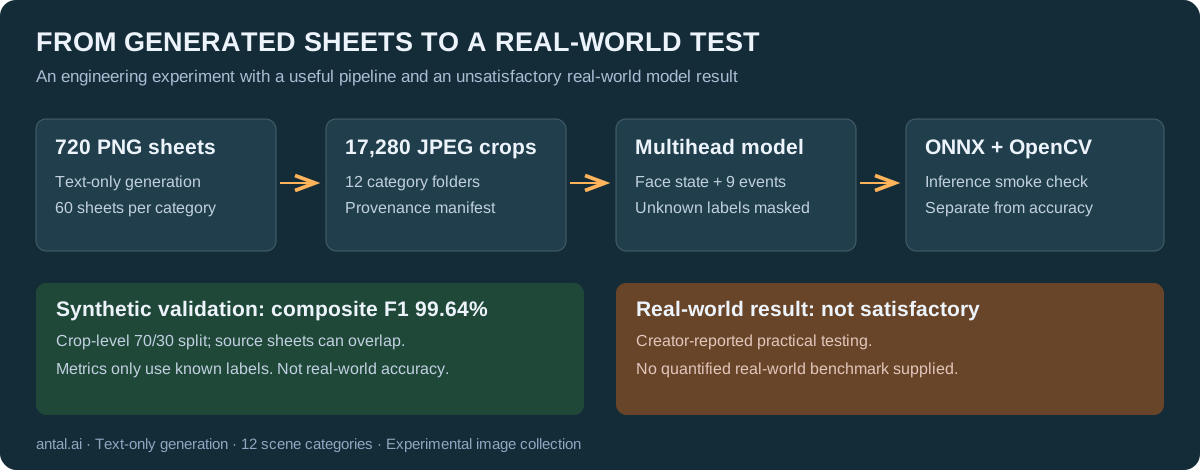
I built a synthetic image dataset for webcam scene classification, trained a MobileNetV4 model, and exported it to ONNX. The best recorded synthetic validation result was a composite F1 of 99.64%. When I tested the model in real conditions, its accuracy was not satisfactory.
That is the outcome of this project. I do not have a quantified real-world benchmark to publish, and I would not present the exported model as a dependable proctoring solution.
There is still useful engineering here: generating structured image collections, cutting them into training examples, keeping provenance, handling incomplete labels, and taking a model across a Python-to-C++ boundary. This note documents those parts, including the limitations that make the validation score much less reassuring than it first appears.
What I wanted the system to recognize
A webcam frame can contain several relevant observations at once. Someone can be holding a phone while another person is visible. A face can be partly outside the frame while paper notes are present. Treating all these observations as mutually exclusive classes is an awkward fit.
The collected images cover twelve folder categories. Three describe face visibility: no_face, one_face_clear, and partial_face. Nine describe other conditions: a visible book, an obstructed camera, an extra person, off-screen eyes, a hand over the mouth, a visible phone, an open mouth, multiple faces, or paper notes.
These are scene labels. They are not reliable evidence of misconduct. A visible book may be permitted, looking away may be entirely ordinary, and an open mouth in one still image does not establish speech. The historical folder name mouth_open_speaking should be read with that last limitation in mind.
The initial pipeline supported a conventional single-head classifier. The later version separates face state from events while keeping one shared backbone. The repository retains both versions, so the design change can be inspected rather than hidden.
Generating contact sheets instead of individual files
I used a Picsart Pro subscription and the model option labelled “GPT Image 2.5” in that interface. This is the service/model label I recorded, not an independently verified underlying model version. I supplied text prompts only; I did not upload reference photographs of real people.
The prompts ask for 1536 × 1024 contact sheets arranged as six columns by four rows, with 24 separate webcam-style scenes. Each prompt targets one category. Within a sheet, camera placement, lighting, people, and surroundings are supposed to vary.
That structure gave the project a practical unit of collection: one generated image could yield roughly two dozen training files. Sixty source sheets per category produced 720 original PNG files.
A significant part of the prompt design was asking for camera geometry and lighting to vary across every category. Otherwise, a model could learn a convenient correlation—say, “dark images mean camera problems”—instead of the intended scene property. Asking for variation is useful, but it does not demonstrate that a generator actually delivered balanced coverage. This dataset has no measured demographic balance or exhaustive human annotation audit.
The prompt book contains thirteen templates. The released image collection contains twelve categories; blurry_or_compressed has a prompt but no corresponding image category. Keeping that distinction explicit avoids advertising a category that buyers will not receive.
A grid request is not a grid guarantee
The splitter looks for dark separators and derives rectangular cells. It then trims the cell edges and saves individual JPEG crops. Detection parameters matter because generated separators are not always perfectly straight, equally spaced, or uniformly dark.
The extraction configuration used here includes a black threshold of 55, a separator ratio of 0.05, and a two-pixel border trim. These are values for this collection, not a universal recipe for every image generator.
For the current dataset, extraction can be reproduced from the repository root with:
python split_grid_thumbnails.py \
  --input ./SuspicousActivity/input \
  --output ./SuspicousActivity/output \
  --train-ratio 0.70 --seed 42 \
  --trim-border-px 2 --black-threshold 55 \
  --separator-ratio 0.05 --min-tile-content-ratio 0 \
  --expected-tiles 24 --debug ./debug/dataset
The output directory must be empty. The script uses the input subdirectory names as categories and creates train/<category> and val/<category> directories, matching the training scripts.
There are five nonstandard sheets in the final collection: two yielded 30 crops each, and three yielded 20 each. Those differences happen to cancel out in the total, giving 17,280 crops. They do not cancel out within each class.
For example, camera_occluded and no_face each contain 1,446 crops, while multiple_faces contains 1,428. The other nine categories contain 1,440 each. “Sixty source images per category” is accurate; “exactly 1,440 training examples in every category” is not.
The source dimensions also deserve a precise description: 719 PNGs are 1536 × 1024, and one is 1535 × 1024. The extracted RGB JPEGs have variable dimensions, with widths from 216 to 375 pixels and heights from 184 to 287 pixels. These ranges describe the collection; they do not mean every width/height combination occurs.
Training resizes images to 224 × 224. The downloadable crops are not uniformly native 224 × 224 images.
Provenance is part of the dataset
The splitter writes a manifest linking each crop to its source sheet, tile index, crop rectangle, category, and split. File names are deterministic, which makes repeated extraction easier to compare.
The rectangle in that manifest locates the cell inside the source collage. It is not a bounding box around a phone, face, book, or person. This release provides folder-level labels, not object-detection annotations.
A packaging audit found 17,280 distinct crop-file SHA-256 hashes and 720 distinct source-file hashes. There were no byte-identical duplicates within either collection. That is a useful integrity check, but it says nothing conclusive about near-duplicate scenes, repeated-looking identities, or semantic independence.
The train/validation allocation is 12,096 and 5,184 images respectively. The split is made at crop level, within each category. The manifest audit shows that all 720 source sheets contribute crops to both sides.
That last detail is especially important. Sibling cells may share rendering style, scene conventions, or other generator-specific characteristics. A crop-level split evaluates generalization within this synthetic collection; it does not establish independence at the source-sheet level, let alone generalization to real webcams.
Two heads, with deliberately incomplete supervision
The multihead model uses a shared MobileNetV4 backbone and two output heads:
- A three-way face-state head, interpreted with softmax.
- A nine-output event head, interpreted with independent sigmoid probabilities.
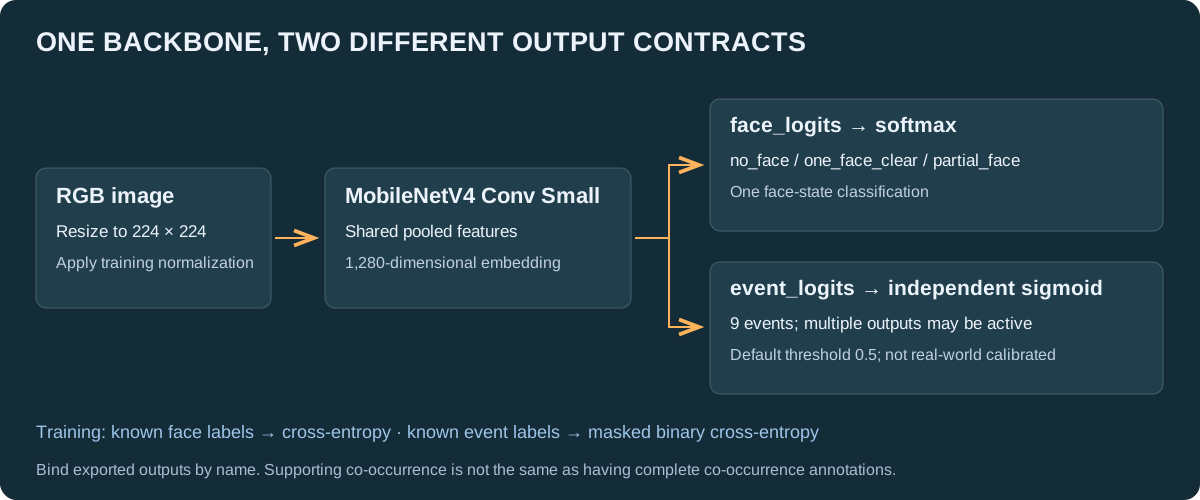
Independent event outputs allow multiple events to be active at once. A softmax across all twelve original folders would force a competition between observations that can coexist.
However, changing the output layer does not magically create complete multilabel annotations. A file in mobile_phone_visible establishes the intended phone label. It does not establish whether every other event is absent.
The training adapter therefore distinguishes known labels from unknown labels:
| Source folder | Face supervision | Event supervision |
|---|---|---|
no_face, partial_face | Corresponding face state | Unknown |
one_face_clear | Clear single face | All nine events treated as negative |
| Any event folder | Unknown | Its matching event positive; other events unknown |
The one_face_clear folder acts as the explicit normal/reference class. Treating its event labels as negative is an assumption built into this dataset design, not a complete per-image annotation exercise.
Face loss is cross-entropy over samples with a known face target. Event loss is binary cross-entropy with a mask, so unknown event labels do not contribute to the loss. In conceptual form:
event_loss = sum(BCE(logits, targets) * known_mask) / sum(known_mask)The implementation also handles batches with no known labels for a head.
This is preferable to silently assigning false negative labels to all other events. But it leaves a serious evaluation gap. The phone detector, for example, sees known negatives from the normal folder; a book-folder image does not automatically count as a phone-negative example during evaluation. A high phone F1 can therefore coexist with unmeasured false positives on other event categories.
The output structure supports co-occurrence. The current annotations do not provide exhaustive validation of co-occurrence or cross-event specificity.
Exporting a model is a separate engineering milestone
The selected backbone is mobilenetv4_conv_small.e2400_r224_in1k. One implementation issue was the feature dimension exposed to the heads: the actual pooled embedding used here has 1,280 elements, while relying on a reported 960-feature value would create a mismatch.
The model code probes the feature output when building the heads. It is a small example of why checking actual tensor shapes is more useful than assuming every library model exposes identical feature conventions.
The repository includes training, ONNX export, Python/OpenCV checks, and a C++/OpenCV reference wrapper. The exported graph has two named outputs, face_logits and event_logits. A consumer should bind by name rather than assume output enumeration order.
The post-processing contract is equally important: apply softmax to face logits and sigmoid to event logits. The training script's default event threshold is 0.5; that is a starting configuration, not a threshold calibrated on a real deployment.
The available FP32 and FP16-with-FP32-I/O exports passed a local OpenCV 4.11 inference smoke check. That demonstrates that those files can execute along that path. It does not validate prediction quality, every target platform, or the separate production C++ application. The C++ reference integration has not been presented here as a compiled and field-validated product.
The download offer described in this article is for images and supporting material. Trained weights and ONNX binaries are not included in the prepared release packages.
What the validation result actually says
In the available pretrained run, the best logged epoch was 29 out of 30:
| Metric | Synthetic validation result |
|---|---|
| Face macro F1 | 1.0000 |
| Event macro F1, on known labels | 0.9928 |
| Composite F1 | 0.9964 |
The composite is the mean of the two head-level macro F1 values. It is not a percentage of all real-world frames classified correctly.
These numbers describe the held-out crop subset under the project's partial-label evaluation rules. They do not measure real-world reliability, complete event annotation quality, or performance on independent cameras and environments.
My practical test was less encouraging: the model was not accurate enough for the intended use. I have not supplied a controlled real-world test set or a numerical failure rate, so it would be misleading to invent one here.
Several plausible contributors deserve investigation:
- Synthetic-to-real differences. The generator's webcam aesthetic may leave cues that are absent or different in real capture.
- Limited negative coverage. Masking unknown labels avoids one kind of labeling error but leaves many important distinctions untested.
- Shared source-sheet characteristics. Crop-level splitting can make validation easier than a source-grouped split.
- Ambiguous still-image targets. Speech and screen-directed attention require more context than a single generated frame reliably supplies.
These are hypotheses supported by the pipeline's design, not isolated causes demonstrated by controlled experiments.
If someone continues this work, I would first establish an independently collected, consented real-world evaluation set with complete labels for the intended outputs. I would then group synthetic splits by source sheet, add hard negatives, and evaluate thresholds and false positives per event. Those are possible next experiments, not a maintenance roadmap or a promise of a forthcoming improved model.
Why publish—and why offer the images separately?
An experiment does not have to end in a deployable model to be useful to another engineer. The source shows a complete path from generated sheets to organized files, partial-label training, and inference integration. It also shows where a reassuring metric can answer a narrower question than the product needs.
The dataset may be useful for prototyping input pipelines, inspecting synthetic-image artifacts, testing relabeling strategies, studying domain shift, or bootstrapping experiments that will later incorporate real data. Whether it helps a particular model is something the buyer must measure.
The USD 99 image and source-code package contains all 17,280 JPEG crops, their 720 original PNG sheets, the twelve applicable generation prompts, and provenance/integrity metadata. A companion source-code ZIP for extraction, training, ONNX export and C++/OpenCV integration is included in the purchase. The originals and crops represent the same underlying scenes; they are not two independent datasets.
The free sample contains 20 crops from each category, 240 images in total, selected from 240 distinct source sheets. Those images are a subset of the paid collection, not an additional test set. Please inspect them before deciding whether the resolution, labels, and visual style fit your experiment.
Get the free 240-image sample · Source package details · Explore the image dataset
This is a self-service snapshot of a personal engineering project. I do not offer installation help, integration work, training support, or promised updates. Check release availability and terms and support policy before buying.
If you are interested in similar practical experiments, you can subscribe to my engineering notes. A related note explores synthetic driver-monitoring video and masks; those masks and videos are a different project and are not included here.
Source and image packages
The source archive contains grid extraction, training, ONNX export and a C++/OpenCV reference wrapper. It contains no images or trained models. The source-code ZIP is included in the USD 99 paid product, alongside the full image dataset. It is not part of the free preview. Read the license terms.
The paid package and its free 240-image sample are described on the dataset page.